

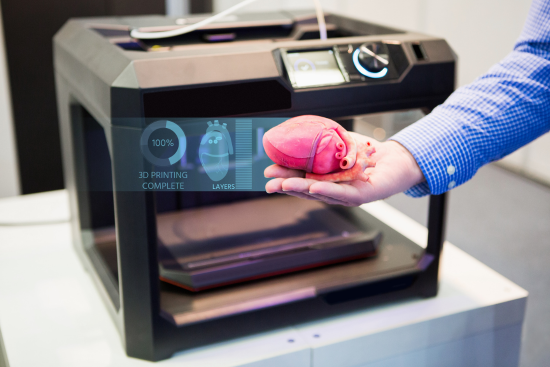
If you’ve typed “what is a 3D printer” into a search bar, you’re probably standing at one of two doorways: either you’re curious how a machine can turn a digital file into a physical object, or you’re already halfway to buying one and want to know if it’s actually worth the money. Both are fair questions, and this guide is built to answer them properly — not with marketing fluff, but with the kind of detail you’d want from someone who has actually watched a print fail at 2 a.m. and had to figure out why.
By the end, you’ll know exactly what is a 3D printer in practical terms, how the technology works layer by layer, what it costs to buy and to run, who genuinely benefits from owning one, where the real risks are, and — because the “what can I even make with this thing” question comes up constantly — fifty concrete project ideas to get you started.
What Is a 3D Printer and How Does It Work?
At its core, a 3D printer is a machine that builds a physical, three-dimensional object by adding material one thin layer at a time, guided by a digital design file. That’s the short answer to what is a 3D printer. The long answer is more interesting, because “3D printing” isn’t one single process — it’s a family of related technologies that all share the same basic philosophy: build up, don’t cut away.
Traditional manufacturing is usually subtractive. You start with a block of material — wood, metal, plastic — and remove everything that isn’t your final part, using a lathe, a mill, or a saw. A 3D printer flips that logic entirely. It’s additive manufacturing: the machine starts with essentially nothing and adds material, layer by microscopic layer, until the object exists. A typical layer is somewhere between 0.1 and 0.3 millimeters thick, so a four-centimeter figurine might be built from over 200 individual layers stacked on top of each other.
Here’s the general workflow, whichever technology is behind the scenes:
- Design or download a 3D model. This is a digital file, usually in STL or OBJ format, created in software like Tinkercad, Fusion 360, or Blender — or downloaded from a repository like Printables or Thingiverse.
- Slice the model. A program called a “slicer” (Cura, Bambu Studio, PrusaSlicer) converts that 3D model into hundreds or thousands of horizontal layers and generates the exact path the printer’s nozzle or laser will follow. This output is a G-code file — essentially a list of coordinates and instructions.
- Print. The machine reads the G-code and builds the object layer by layer, either by melting and extruding plastic, curing liquid resin with light, or fusing powder.
- Post-process. Depending on the technology, this can mean simply popping the part off the build plate, or it can involve removing support structures, washing off excess resin, and curing the part under UV light.
The Two Technologies You’ll Actually Encounter
When people ask what is a 3D printer, they’re usually picturing one specific type without realizing there are several. For a home or small-business buyer, it really comes down to two:
FDM (Fused Deposition Modeling). This is what most people mean when they picture a 3D printer: a nozzle heats a plastic filament to around 190–260°C and extrudes it in thin strands, building the object from the bottom up. It’s the most affordable, most forgiving, and most widely used method for hobbyists, schools, and small workshops.
Resin printing (SLA/MSLA). Instead of melting plastic, these printers use a screen or laser to cure liquid photopolymer resin, layer by layer, inside a vat. The results are dramatically more detailed — ideal for miniatures, jewelry patterns, and dental models — but the process is messier, the resin is a skin irritant before curing, and it needs proper ventilation.
There are also industrial technologies — SLS (selective laser sintering) for nylon powders, and DMLS/SLM for metal parts — but those live in factories and research labs, not living rooms, so we’ll mention them only where relevant.
A Brief History: 3D Printing Didn’t Start Yesterday
One detail that surprises most first-time buyers: 3D printing isn’t a recent invention. The core stereolithography process was patented back in 1986 by engineer Chuck Hull, who also co-founded 3D Systems, one of the industry’s oldest companies. For roughly two decades the technology stayed locked inside expensive industrial machines, largely because key patents kept the field closed to hobbyists.
The turning point came when the foundational FDM patents began expiring around 2009. That single event triggered the open-source RepRap movement and, a few years later, the wave of affordable consumer machines that eventually produced brands like Creality, Prusa, and Bambu Lab. In other words, the $200 printer sitting on a desk today exists largely because a patent clock ran out — a nice piece of trivia that also explains why the hobbyist market only really took off in the last decade or so, even though the underlying science is nearly forty years old.
Is It Worth Buying a 3D Printer? Honest Pros and Cons
This is the question that actually matters, and the honest answer is: it depends entirely on what you’d use it for. Below is a balanced breakdown, because no serious answer to what is a 3D printer worth to you should skip the downsides.
| Pros | Cons | |
|---|---|---|
| Cost | Entry machines now start around $170–$250 | Filament, tools, and upgrades add up over time |
| Creativity | Makes literally any small object you can design | Steep learning curve for custom designs |
| Speed | A small part can print in under an hour | Larger or detailed prints can take 10+ hours |
| Repair value | Print replacement parts instead of buying new | Not every material matches store-bought strength |
| Noise/space | Quiet enclosed models exist | Needs dedicated, ventilated space |
| Learning | Great STEM and hands-on skill builder | Requires patience through failed prints |
The genuine upsides:
- You can prototype an idea and hold it in your hand within hours instead of waiting weeks for a manufacturer.
- Replacement parts for broken appliances, toys, or furniture fittings often cost pennies in filament instead of the price of a whole new product.
- It’s a legitimately excellent tool for teaching design thinking, geometry, and problem-solving to teenagers and adults alike.
- Small business owners can produce short runs of custom products — jewelry, phone stands, cosplay props — without paying for injection-mold tooling.
The genuine downsides:
- Nothing about 3D printing is “set it and forget it” at first. Expect a run of failed or warped prints while you learn bed leveling, temperature tuning, and material behavior.
- Print quality on budget machines can look visibly layered unless you sand, prime, and paint the finished part.
- Ongoing costs — filament, nozzles, build plates, occasional part replacement — are real, even if individually small.
- Resin printers, in particular, involve chemicals that need gloves, ventilation, and careful disposal.
If your interest is a one-off gift or a single repair job, it’s often cheaper to use a local print service instead of buying a machine. If you know you’ll print regularly — for hobbies, repairs, teaching, or a side business — that’s when owning one starts to pay for itself.
How Much Does a 3D Printer Actually Cost?
Prices have dropped sharply over the past few years, and 2026 pricing looks nothing like the market from even five years ago. Here’s a realistic breakdown by tier, based on current retail pricing:
| Tier | Typical price | What you get |
|---|---|---|
| Entry-level FDM | $150–$250 | Auto bed leveling is now standard even here; smaller build volume (roughly 180–220 mm) |
| Mid-range FDM | $250–$450 | Faster speeds, enclosed chambers, better reliability, sometimes multi-color capability |
| Enclosed/advanced FDM | $450–$900 | CoreXY motion systems, higher speeds, tougher engineering filaments like ABS or PETG |
| Entry resin (SLA) | $150–$300 | High detail for miniatures and small models, smaller build area |
| Multi-color add-ons | $300–$600 extra | Automatic material systems that feed multiple filament spools |
A genuinely capable first machine, the kind that won’t frustrate a beginner into quitting, realistically starts around $200. Machines below that price often skip auto bed leveling, and that single missing feature is responsible for a disproportionate share of failed first prints.
But the printer’s price tag is only part of the story. Budget roughly:
- Filament: $18–$25 per kilogram spool for standard PLA; specialty filaments (carbon-fiber-reinforced, flexible TPU, wood-fill) run higher.
- Resin: $20–$30 per liter for standard resin; specialty dental or engineering resins can reach $40–$80 per liter.
- Electricity: More on this below, but it’s a genuinely minor cost.
- Maintenance parts: nozzles, build plates, and belts, typically $10–$40 each, replaced occasionally rather than routinely.
A realistic first-year budget, printer included, tends to land somewhere between $250 and $450 for someone using a budget-to-mid-range FDM machine at a hobbyist pace.
What Do 3D Printers Actually “Consume” Instead of Ink?
A question that trips up a lot of newcomers: there’s no ink cartridge to replace. Instead, an FDM printer consumes filament — plastic thread wound on a spool, usually PLA (plant-starch-based and the easiest to work with), PETG (tougher and more heat-resistant), or ABS (durable but needs an enclosure and ventilation because it releases fumes when melted). A resin printer instead consumes liquid photopolymer resin, stored in bottles and poured into a vat.
Filament is sold by weight, most commonly 1 kg spools, and a kilogram goes a surprisingly long way — enough for dozens of small to medium prints depending on how much infill (internal density) each object uses. This is the actual “consumable” cost people mean when they ask what a 3D printer costs to run day to day, and it’s genuinely modest compared to the running costs of, say, a traditional inkjet printer.
How Much Electricity Does a 3D Printer Use?
This worry comes up constantly, and the reassuring answer is: not much. A typical home FDM printer draws somewhere between 50 and 150 watts while actively printing, with the heated bed pulling the most power during the initial warm-up phase and settling lower once it reaches temperature. For comparison, that’s less than a hairdryer and roughly in the same range as a desktop computer.
Running a printer for 5 hours a day at an average of 100 watts works out to about 0.5 kWh per day — at typical residential electricity rates, that’s a few cents to maybe twenty cents a day depending on your region’s pricing. Even a household that prints every single day rarely sees a noticeable jump on the electricity bill. Resin printers, notably, use even less power than FDM machines, since they don’t need to melt plastic — the light source that cures the resin is comparatively low-draw.
Can Children Use a 3D Printer?
Yes, with the right setup and supervision — and this is genuinely one of the better STEM tools available to families and schools. That said, the honest answer splits by technology:
FDM printers are reasonably kid-friendly from around age 8–10 upward, provided an adult handles the initial setup and the child is taught that the nozzle and heated bed are hot surfaces (nozzles typically run 190–260°C, easily capable of a burn). Loading filament, starting prints from an app, and picking designs from a kid-friendly library like Printables’ education section are all tasks a supervised child can manage.
Resin printers are a different story and are best kept as an adults-only tool, or used with strict supervision and protective gloves. Uncured resin is a skin and eye irritant, the isopropyl alcohol used for cleaning parts is flammable, and proper ventilation matters. This isn’t a printer type to hand to a child unsupervised.
Plenty of schools now run classroom FDM printers specifically because designing, slicing, and troubleshooting a print teaches spatial reasoning, patience, and iterative problem-solving in a way that’s hard to replicate with a worksheet. If you’re buying one specifically for a child, look for enclosed models — the enclosure keeps curious fingers away from the hot nozzle and also muffles noise and smell.
Who Actually Benefits Most From Owning One?
Not everyone needs a 3D printer, but for certain groups, the case is strong:
- Hobbyist makers and tinkerers — the classic use case, and where most machines end up.
- Tabletop gamers and miniature painters — resin printers in particular have reshaped this hobby, letting people print custom terrain and figures instead of buying them.
- Cosplayers and prop makers — armor pieces, helmets, and detailed accessories that would otherwise require sculpting from scratch.
- Small product businesses and Etsy sellers — short custom runs without the up-front cost of injection molds.
- Architects, product designers, and engineers — rapid prototyping turns a CAD file into a physical model to check fit and form before committing to expensive tooling.
- Educators — STEM classrooms, robotics clubs, and university engineering departments.
- Medical and dental fields — surgical guides, dental aligners, and anatomical models for training are now routinely printed rather than manufactured traditionally.
- Home repair enthusiasts — the “print the broken clip instead of buying a whole new appliance” crowd, which honestly covers most owners eventually.
If none of these describe you, and your only interest is a single novelty item, it’s genuinely more economical to order a one-off print from a local maker space or online print service.
Are There Real Risks or Dangers?
3D printers are not dangerous appliances in the way people sometimes assume, but they aren’t entirely risk-free either, and a fair answer to what is a 3D printer’s downside list includes these:
- Heat. Nozzles reach temperatures well above the point of causing burns, and heated beds get hot too. Never leave a printer running completely unattended for long stretches, especially overnight in early use, until you trust the machine’s reliability.
- Fumes. ABS filament and, to a lesser degree, some other plastics release fine particles and odor when melted. Print in a ventilated room, and consider an enclosure with a filtered vent if you print ABS regularly.
- Fire risk, though rare. Like any electrical heating appliance, a malfunctioning printer left unsupervised is a fire hazard. Reputable modern machines include thermal runaway protection, which shuts the printer down if temperatures behave abnormally — a feature worth confirming before buying.
- Resin chemicals. As covered above, uncured resin and its cleaning solvents require gloves, eye protection, and ventilation.
- Small parts and choking hazards. Obviously relevant if young children are around finished prints.
None of this should be alarming — millions of these machines run safely in homes worldwide — but it does mean a 3D printer deserves the same basic respect as an oven or a soldering iron, not the casual treatment you’d give a toy.
Maintenance: What Ongoing Care Looks Like
3D printers are mechanical devices with moving parts, so they need occasional attention, though far less than most beginners expect. Routine maintenance typically includes:
- Bed leveling checks, though auto-leveling on modern machines has made this largely automatic.
- Nozzle cleaning or replacement, since nozzles wear down after heavy use, especially with abrasive filaments like carbon-fiber blends.
- Belt tension checks, to keep prints accurate and prevent layer shifting.
- Lubricating rails and rods every few months, depending on usage.
- Clearing filament jams, an occasional but normal part of ownership.
- Cleaning the build plate between prints so new layers adhere properly.
None of this requires specialized tools beyond a set of hex keys, most of which ship with the printer. Budget an hour or two a month for a machine used regularly, and closer to a few minutes per print for the basics like plate cleaning.
Should You Buy a Used 3D Printer?
Buying secondhand can be a genuinely smart move — but only with a careful check, because a used printer hides its history in a way a used car doesn’t.
What to check before buying used:
- Ask for a recent test print and inspect it for consistent layer lines, no visible warping, and clean corners.
- Check the nozzle for wear — an oval-shaped hole instead of round means it’s due for replacement.
- Ask how many hours or how much filament it’s printed; a printer that’s run constantly for years has more wear on belts, rails, and the hotend.
- Confirm all original accessories are included: the build plate, any tools, the power supply, and ideally the box.
- Look up the specific model’s known failure points before buying — some early budget models have well-documented weak spots in their forums and communities.
A used mid-range printer in good condition can be an excellent value, often letting you buy a machine a tier above what you’d afford new. The main risk is buying someone else’s frustration — a machine they gave up on because of a fixable but annoying issue. Sticking to well-documented, popular models (rather than obscure or discontinued ones) makes replacement parts and troubleshooting advice far easier to find later.
50 Ideas: What Can You Actually Make With a 3D Printer?
This is where the “what is a 3D printer for” question gets genuinely fun to answer. Here are fifty real project categories, grouped so you can jump to whatever matches your interest.
Around the house
- Cable and cord organizers
- Replacement drawer handles
- Custom coat hooks
- Soap dishes
- Plant pots and hanging planters
- Kitchen utensil holders
- Spice rack inserts
- Broken appliance clips and brackets
- Cabinet door bumpers
- Wall-mounted key holders
Desk and office 11. Phone stands and docking cradles 12. Cable clips for your desk edge 13. Pen and pencil holders 14. Monitor risers 15. Headphone hooks 16. Laptop stands 17. Custom drawer organizers 18. Business card holders 19. Desk nameplates 20. Whiteboard marker trays
Gifts and personal items 21. Custom keychains with names or initials 22. Personalized phone cases 23. Jewelry — pendants, earrings, rings (especially via resin) 24. Photo frames 25. Bottle openers 26. Custom coasters 27. Small trinket boxes 28. Engraved ornaments 29. Wedding cake toppers 30. Personalized cookie cutters
Hobbies and games 31. Tabletop gaming miniatures and terrain 32. Chess sets 33. Puzzle boxes 34. Dice towers and trays 35. Card game holders 36. Model train scenery pieces 37. Custom board game pieces 38. Fishing lures 39. Drone frame parts 40. RC car body panels
Costumes, props and creative work 41. Cosplay armor and helmets 42. Prop weapons for photography or theater 43. Masks and face pieces 44. Costume jewelry and accessories 45. Sculptures and art pieces
Practical, technical and educational 46. Replacement parts for broken toys or appliances 47. Custom tool organizers for a workshop 48. Prototypes for a product idea 49. STEM classroom models (gears, cross-sections, anatomical models) 50. Camera mounts and accessories
Notice how few of these require any design skill at all — sites like Printables, Thingiverse, and MakerWorld host free, ready-to-print files for the vast majority of the list above. Design skills only become necessary once you want something genuinely custom.
Curious Facts Worth Knowing
A few details that rarely make it into buying guides but are worth knowing if you’re getting into this hobby:
- The largest 3D-printed structures today aren’t small objects at all — entire houses have been printed using giant gantry-style concrete printers, with some completed in under 48 hours of print time.
- NASA has tested 3D printing food in space, and printers aboard the International Space Station have manufactured tools and replacement parts on demand rather than waiting for a resupply mission.
- Some surgeons now use 3D-printed, patient-specific anatomical models — created from a patient’s own CT scan — to rehearse complex operations before ever making an incision.
- The word “filament” existing as the go-to term for FDM material is a direct borrow from the lightbulb industry, where it originally described the thin wire that glows when heated.
Final Verdict: Is a 3D Printer Worth It for You?
After all that, the honest, unglamorous answer to what is a 3D printer worth to any specific buyer is: it depends on whether you’ll actually use it. If you have a genuine reason — repairs, a hobby, teaching, prototyping, a small product line — a modern $200–$400 machine will pay for itself many times over and open up a genuinely satisfying creative outlet. If your interest is a single curiosity project, borrowing time at a local maker space or ordering from a print-on-demand service is the more sensible route. Either way, you now know exactly what a 3D printer is, how it works, what it costs, and what it can realistically do — which puts you well ahead of most first-time buyers.
Frequently Asked Questions
What is a 3D printer in simple terms?
A 3D printer is a machine that builds a solid, physical object by adding material layer by layer, following instructions from a digital design file — the opposite of traditional manufacturing, which usually removes material from a larger block.
How does a 3D printer actually work step by step?
You start with a 3D design file, run it through slicing software that breaks it into thin horizontal layers and generates a set of machine instructions, and then the printer follows those instructions — melting and extruding plastic (FDM) or curing liquid resin with light (SLA) — one layer at a time until the object is complete.
Is a 3D printer worth buying for a beginner?
Yes, if you have an ongoing reason to use it regularly — hobby projects, repairs, gifts, or learning. A reliable entry-level FDM machine with auto bed leveling, priced around $200–$250, is a sensible starting point that won’t discourage a first-timer with constant failed prints.
How much does a 3D printer cost to buy and run?
Entry machines start around $150–$250, mid-range models run $250–$450, and running costs mostly come down to filament at roughly $18–$25 per kilogram spool, plus modest electricity use and occasional replacement parts like nozzles.
Can kids safely use a 3D printer?
Supervised children from around age 8–10 can use FDM printers safely, since the main hazard is the hot nozzle and bed. Resin printers, because of the liquid chemicals involved, are better treated as an adults-only tool.
What material does a 3D printer actually use instead of ink?
FDM printers use spooled plastic filament — commonly PLA, PETG, or ABS — while resin printers use bottled liquid photopolymer resin. Neither uses ink cartridges.
How much electricity does a 3D printer use?
Typically 50–150 watts while actively printing, comparable to a desktop computer, which usually adds only a few cents to a dollar or so per day to an electricity bill even with daily use.
Is it safe, or is a 3D printer dangerous?
3D printers are generally safe household appliances, but they involve real heat, occasional fumes (especially with ABS), and — for resin machines — chemicals that need gloves and ventilation. Basic precautions make the risk comparable to other kitchen or workshop appliances.
Is buying a used 3D printer a good idea?
It can be, especially for popular, well-documented models. Check a recent test print, inspect the nozzle for wear, ask about total usage hours, and confirm all original accessories are included before buying.
What can you actually make with a 3D printer?
Everything from household organizers, replacement parts, and desk accessories to jewelry, cosplay armor, tabletop gaming miniatures, prototypes, and STEM classroom models — the fifty ideas above are a starting list, not a ceiling.